Helloooo!
I received my CKA results today, so I wanted to share my experience and how I prepared for the exam. Hopefully, some of these tips will be helpful for anyone preparing for their own CKA! ☸️✨
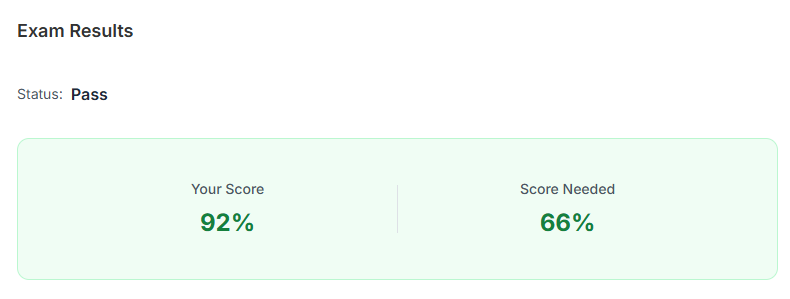
I’ve been working in a Kubernetes team for almost two years. I spent around a year preparing for the CKA, and in the last three months, I focused more on mock exams and exam simulators such as Killer.sh.
Here are some resources and tips that helped me along the way!
📚 Recommended Resources
These are the resources I used during my preparation:
- The Kubernetes Book by Nigel Poulton: Another resource to help build your Kubernetes knowledge.
- KodeKloud CKA Certification Course and Mock Exams: Work through all the labs provided in the course. The more hands-on practice, the better!
- Alta3 CKA videos: I rewatched these videos a lot and found the tips and tricks really helpful!
- Killercoda: Great for practising Kubernetes tasks in a browser-based environment, there is also a playground which is free for 1 hour.
- Killer.sh: This will be likely included with the CKA exam bundle. I found the environment very similar to the actual exam.
💡 Tip: The CKA exam is often on sale, so keep an eye out for discounts before purchasing!
📝 Preparation Tips
1. Practise!
I highly recommend completing all the labs in the KodeKloud CKA course. Once you are comfortable with the concepts, spend more time on mock exams and exam simulators.
When attempting mock exams, try your best to solve each question. If you struggle with a question, don’t worry! Revisit it the next day and try again. This helps you understand the solution better.
I also recommend keeping the Kubernetes documentation open alongside your labs. Practise navigating the docs so you know where to find the information you need.
2. Understand the exam curriculum
Check the official CKA programme changes for the latest exam updates and the breakdown of exam topics.
At the time of writing, troubleshooting accounts for 30% of the exam. Make sure you practise troubleshooting as well!
3. Get comfortable with Vim
Here are some Vim shortcuts that I found useful when editing YAML files during the exam:
| Shortcut | What it does |
|---|---|
gg | Jump to the first line |
$ | Jump to the end of the current line |
dd | Delete the current line |
dG | Delete from the current position to the end of the file |
V | Enter visual line mode |
> / < | Indent right / left |
gv | Reselect the previous selection |
u | Undo in normal mode |
/word | Search for word |
n | Find the next occurrence |
Practise these during your labs so they become more familiar 🐣
🖥️ Getting Ready for Exam Day
1. Check your setup beforehand
Before exam day, I recommend going through the PSI tutorial and checking that your setup is ready.
A few things to keep in mind:
- Have your required microphone and other permitted equipment ready. Follow the latest PSI instructions for the exact requirements, you will get an e-mail few days prior to your exam.
- If you use wireless devices, such as a wireless mouse, make sure they are charged. My mouse ran out of battery shortly after the exam started! 😅
- I was told to turn off my speaker during my exam, so I’m not quite sure whether a wired speaker is actually required.
- You cannot use a physical calculator, but the PSI environment has a built-in calculator. I found it a little laggy, and the screen flickered whenever I entered a number, so don’t panic if you experience the same thing.
- For notes, I used Mousepad in the virtual environment. You can find it under Menu → Accessories → Mousepad.
I recommend using a large monitor if possible, along with a setup that you’re comfortable working with.
2. Get familiar with the exam environment
The CKA bundle includes two Killer.sh sessions. I recommend completing both before your exam, with the second session closer to exam day so the environment is still familiar.
Practise opening and using the tools you will need, including the terminal, Firefox and mousepad.
Don’t rush when the exam starts. Take a moment to get your environment set up the way you want it.
3. Prepare your exam room
Check in starts 30 minutes before your scheduled exam time. During check-in, your proctor will guide you through the room scan.
Here are some things I learnt:
- Clear your desk and keep your room as clutter-free as possible.
- Have your ID ready to show the proctor.
- Water in a clear glass is permitted!
- Posters and artwork around the room are fine, but the proctor may ask you to show something more closely.
- There may be an option to scan a QR code and use your phone camera for the room scan. I used my webcam.
- If you wear glasses, be prepared for the proctor to inspect them and check both wrists for smart devices.
Follow the current PSI instructions for the full list of permitted items and room requirements.
4. After the exam
Don’t worry if you don’t get the results within a few hours of completing the exam, my results took around 24 hours.
⌨️ Terminal and Keyboard Tips
1. Copy and paste shortcuts
In the terminal, the usual shortcuts are:
- Copy:
Ctrl + Shift + C - Paste:
Ctrl + Shift + V
In applications such as Firefox and mousepad, use:
- Copy:
Ctrl + C - Paste:
Ctrl + V
You can also open multiple terminal tabs if that suits you.
I experimented with my terminal preferences and found an option to copy selected text directly, which helped me save time. Have a play around with the available settings in your practice environment to see what works best for you.
2. Make searching the documentation easier
When searching in Firefox with Ctrl + F, remember to turn off Match Case unless you want the case-sensitive results.
You can also search the Kubernetes documentation for a resource type, such as kind: deployment, to find relevant YAML examples. Alta3 YouTube videos explains this tip as well!
Each exam question may also provide a link to the recommended documentation as well.
3. Make use of aliases and tab completion
During my exam, I could use k as an alias for kubectl.
Tab completion is also your best friend when typing commands. It can save time and help avoid typos.
I recommend practising common commands until you can type them comfortably without having to look them up every time.
For example:
# Run a pod
k run pod --image nginx

# Create a service account
k create sa my-sa

# Force-delete a pod quickly!
k delete pod eevee --grace-period 0 --force

# Generate YAML without creating the resource
k create deployment nginx --image=nginx --dry-run=client -o yaml > file.yaml
The examples above are starting points, so make sure you adapt the resource names and commands to the question you are solving.
4. Remember the patch-file option
When using kubectl patch, you can provide a patch file instead of writing the patch inline.
For example:
k patch example-resource --patch-file patch-file.yaml
I found it useful to know this option was available, as a patch was easier to manage in a separate file.
🚀 Exam Strategy
1. Read the entire question first
Before jumping into a task, check the total number of questions in the exam.
For each question, scroll all the way to the bottom and read everything before getting started. There may be important instructions, such as resources you must not modify.
Copy and paste namespace names, resource names and other identifiers from the question whenever possible. This reduces the chance of losing marks because of a typo.
2. Check your cluster context
Remember to follow the cluster and node access instructions provided for each question. In my experience, questions often involved different cluster contexts, so I needed to switch environments using the provided SSH commands.
For example, my workflow could involve commands such as:
exit
ssh new-question
Use the actual commands and connection details provided in your exam environment. Always double-check that you are working in the correct cluster before making changes.
3. Manage your time
I tried to spend no more than around seven minutes per question before considering whether to move on.
If you are stuck or blocked, flag the question and come back to it later.
I was blocked on the second question, but when I returned to it later, I was able to resolve the issue! 😌
The timer counts down from 120 minutes and displays warnings as you approach the end, including when you have around 30 minutes remaining.
Don’t let one difficult question consume too much of your time. Move on to the next question, so you have time to solve the remaining questions.
4. Verify your work before moving on
Before moving to the next question, take a moment to verify that everything is working as expected.
For example:
- Are your pods running?
- Are there any unexpected restarts?
- Did you create the resources in the correct namespace?
- Do the resource specifications match the question?
- Are there any additional verification commands you can run?
Commands such as kubectl describe can help you inspect the resources you have created and identify issues.
5. Use the documentation and mock exam experience
The more mock exams you attempt, the more familiar you’ll become with different question types and the documentation.
Practise finding relevant YAML examples quickly and adapting them to the task at hand.
I also recommend revisiting the Alta3 CKA videos for additional tips and tricks.
⚠️ A few more exam day reminders
- Don’t talk during the exam Avoid getting too close to the webcam or covering your mouth. The system may display a warning if you do!
- Use the proctor chat when needed The proctor may communicate with you through the chat window. If you have questions, use the designated chat interface.
- Don’t rely on extra mouse buttons Shortcuts assigned to additional mouse buttons may not work in the exam environment.
- Take your time at the beginning Get your terminal and other tools ready before diving into the questions.
- Stay calm if something goes wrong. If you’re stuck, move on when appropriate and revisit the question later.
🎉 Wrapping up
My biggest recommendation is to practise as much as possible and get comfortable with the exam environment before exam day.
The mock exams helped me build confidence in navigating Kubernetes documentation, solving different types of questions and managing my time.
I hope sharing my experience helps others preparing for the CKA. Good luck with your Kubernetes journey! ☸️🐣💚 You can do it!